
From the Travely-Family archive · Yacht, Sea and Equipment
Satellite Communications for a Circumnavigation. Satellite Communication Systems
An original publication from the former Travely-Family website. This English translation was preserved from the technical-site archive without editorial rewriting.
Satellite communications for a circumnavigation. Equipment. Weather forecasts. Email. Budget
By popular demand, we’ll explain how we have set up satellite communications for an internet connection aboard our yacht in the heart of the Ocean and other wild places.
ATTENTION: The information in this article will help you save a tidy sum that you might otherwise spend on satellite communications. So, after reading it, click the link Paypal.me/TravelyFamily and show the author your generous financial appreciation. 🙂
Equipment
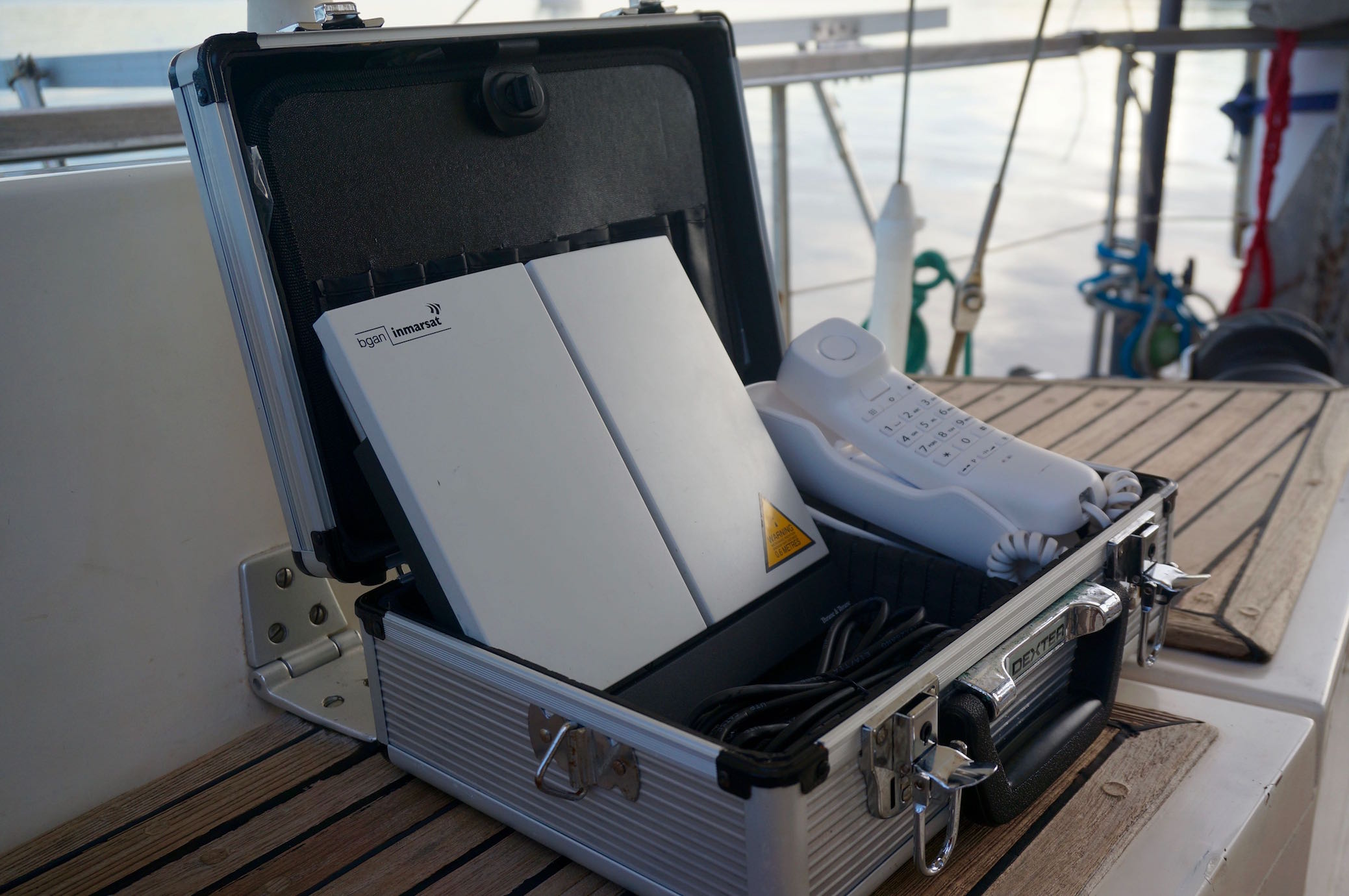
The satellite modem is not even the marine version, but a land-based Inmarsat BGAN. A new one costs about US$3,000. Ours is second-hand. We bought it on eBay for €400. A dedicated marine modem costs twice as much. Connect an ordinary €12 telephone handset to the modem, and it turns into a satellite phone with outgoing calls costing €1 per minute (incoming calls are free).
explorer-500
Wi-Fi router. RedPort Optimizer. Connected to the modem by a LAN cable. Besides broadcasting a Wi-Fi signal, it also compresses traffic by roughly a factor of ten (with an account and an annual fee of about €100 for the first year and €50 for subsequent years). The account comes with a dedicated email address, which we don’t give to anyone in order to avoid spam. The router costs €175.
Dedicated XGate software. We have it installed on an iPad, an Android smartphone and a MacBook. We used the iPad throughout the voyage. The others are backups.
XGate works with the RedPort Optimizer and sends and receives ONLY authorised internet traffic. In our case, that means email. There are none of the unauthorised connections that ALL gadgets love to make as soon as they get hold of an internet connection, such as app updates and various other service requests.
Weather forecasts. Sending and receiving email
We mainly use two services (both free of charge):

1. For receiving GRIB files: saildocs.com. All you need to do is send an email request in the prescribed format, specifying:
the coordinates bounding the required rectangle how many days of forecast are needed (we usually request 3 days) the time intervals in hours (3, 6, 12, etc.). In the Ocean, we used 6-hour intervals; when sailing in coastal waters, usually 3-hour intervals.
which parameters are required (wind/pressure are enough for us)
The reply arrives within a few minutes. The file you receive can then be opened in any program capable of displaying GRIB files.
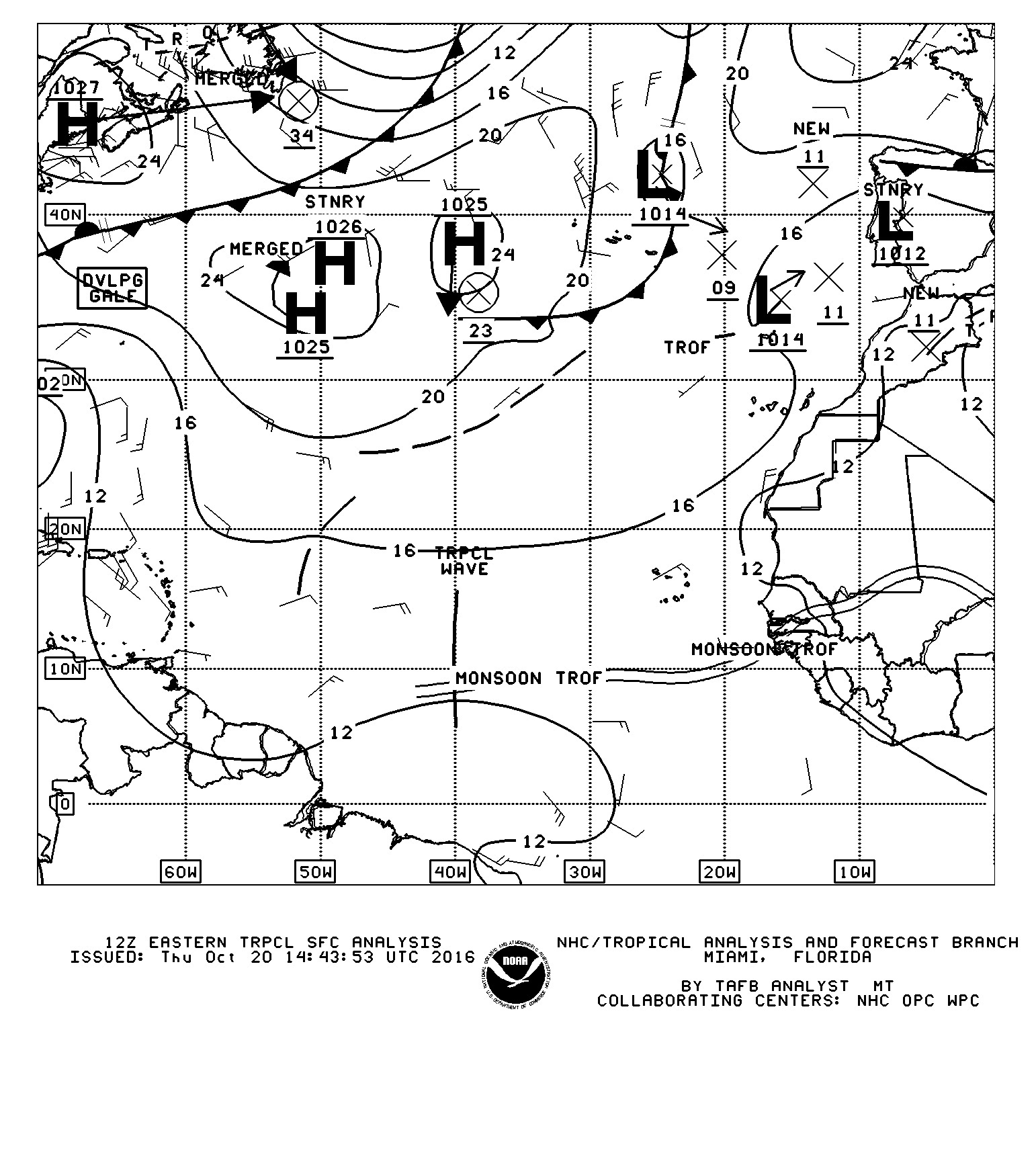
2. For weather charts (Weather Fax): the nws.noaa.gov website. The procedure is the same: an email request specifying the name of the required area, followed by a reply a couple of minutes later.
As a backup way of receiving weather charts, in case satellite communications are suddenly unavailable, we use an ordinary shortwave radio receiver. At the specified time, you tune in to the required frequency and launch a dedicated app—in our case, HF FAX on the iPad. Different forecast-broadcasting stations transmit forecasts for different regions at different times. Schedules listing stations, frequencies and regions can be downloaded from the internet.
The radio signal, which sounds like a fax machine squealing, is picked up by the receiving device’s microphone and decoded by HF FAX. The result looks something like this:

Email is sent and received through XGate. As I wrote above, the account comes with an email address. We set our main email address to forward mail to this address. We only allow forwarding from selected addresses—family and close friends. Don’t forget to allow the addresses from which GRIB files and weather charts are sent.
As a backup, we added a rule allowing through messages with a certain code word (Offshore, for example) in the subject line. This is for cases when we need to receive an email from someone who has not been added to the whitelist.
Satellite communications. Budget
Obviously, in this case the costs depend directly on the amount of traffic passing through the modem. We have tried to reduce it as much as possible.
All our megabytes—or rather, even kilobytes(!)—are email only.
The RedPort Optimizer–XGate combination compresses all traffic passing through it by a factor of ten!

Properly configured forwarding from the main email address allows only essential mail through.
During our Atlantic passage (described here— 1, 2, 3, 4, 5, 6, 7, 8, 9, 10, 11), which lasted 23 days, we used satellite communications every other day. We downloaded weather forecasts, received and sent several emails (3–8), and posted an update on the website. In the end, we used 650 kilobytes—less than one megabyte, which costs €7 under our tariff plan.
Total cost of our satellite internet during the Atlantic passage
1. Equipment — Inmarsat BGAN modem (second-hand) + telephone handset: €412 — RedPort Optimizer: €175
2. Annual subscription fee: €50 in our case, since this is not our first year using the service
3. Data used over 23 days: €4
Update, 05.04.2018
As of 1 January 2018, the free ride may not be over, but it has been curtailed a little 🙂
Inmarsat removed the option of paying for a small amount of data with a two-year validity period. Now, considering that we have about 50 MB of unused data left, we buy 5.5 MB for €99, valid for 3 months. This allows us to preserve the unused data at minimal cost. Packages can be activated from any date. We have now bought 3 packages, each set to activate every 3 months, which will allow us to continue using satellite communications for another 9 months.
For reference: Sending and receiving 10–15 emails (without attachments), a three-day GRIB file and a weather chart through our system uses 100–120 KB of data.
Now is the perfect time to thank the author generously for such a useful article by clicking Paypal.me/TravelyFamily